


Introduction
When people talk about memory in AI agents, they usually jump straight to persistence — user profiles, stored preferences, cross-session recall. Long-term memory is the exciting part.
But in Copilot Studio, the harder and more immediate problem is short-term memory: what the agent can reliably hold onto during a single conversation.
If you’ve built anything multi-step or tool-heavy, you’ve probably noticed this pattern. Context feels rich and coherent while the agent is actively executing in a tight loop — calling tools, reasoning, responding. But as soon as you move beyond that immediate execution window, the agent’s grasp of earlier decisions or constraints can degrade surprisingly quickly. Not catastrophically, but enough that you start seeing drift: re-asking questions, losing parameters, or defaulting back to generic behaviour.
So the issue isn’t just context size. It’s context continuity across execution passes. The agent isn’t losing information in a literal sense — it’s losing a clean, durable representation of what should still matter once the execution loop has closed.
Types of Memory in Copilot Agents
When discussing memory in agents, it helps to separate a few distinct layers. They’re often conflated, but they serve very different purposes in practice: short-term memory, long-term memory, and episodic memory. Each answers a different question about what the agent should retain and for how long.
Short-term memory is session-bound state. It exists only for the duration of a conversation and captures what the agent has already established that should still influence behaviour. This includes things like confirmed parameters, active task position, inferred role or scenario, and user preferences expressed during the chat. You use short-term memory whenever continuity across turns matters, but persistence beyond the session does not.
A simple use case would be a Copilot helping draft a document where the user specifies tone, audience, and format early on. Those preferences should shape all subsequent outputs in that session, but there’s no need to store them permanently once the conversation ends.
Long-term memory is persistent state that survives across sessions and interactions. This is where stable user or organisational information lives — saved preferences, profile attributes, historical decisions, or learned defaults. Long-term memory is appropriate when the agent should behave differently the next time it encounters the same user or context.
For example, an internal Copilot that learns a team’s preferred reporting structure or a user’s default language and format choices would store those in long-term memory so future conversations start from that baseline rather than rediscovering it.
Episodic memory sits slightly differently. Rather than storing stable facts or current session state, it records specific past interactions or events that may be relevant later. It’s essentially a recallable history of “what happened before” in similar situations. Episodic memory is useful when prior cases or conversations provide context that could inform current reasoning.
A typical use case might be a support Copilot that can reference previous incidents: recalling that a similar issue occurred last month, what resolution was applied, and whether it succeeded. The agent isn’t just remembering a preference or a parameter — it’s recalling an episode.
In practice, most Copilot Studio designs start with short-term memory because it directly stabilises conversations. Long-term and episodic layers add value as agents mature and need continuity across sessions or awareness of past interactions.
Short-Term Memory as Deliberate State Between Execution Passes
Building on the earlier distinction between memory types, this section focuses specifically on short-term memory — the session-bound layer that stabilises behaviour across turns.
The most reliable mental model I’ve found is to treat Copilot conversations not as continuous transcripts but as sequences of execution passes separated by state hand-offs. Each pass has a strong, local context window while the agent is reasoning and acting, but that coherence fades unless something explicit carries forward.
During a pass, context is naturally coherent. Between passes, you need an explicit bridge.
That bridge is short-term memory: a structured representation of what the agent has already established and should continue to honour. Not everything the user said — just what the agent has committed to.
In practice, that tends to include confirmed selections, resolved parameters, inferred role or scenario, current task position, preferences expressed by the user, and any constraints that should shape future actions. Once captured, these become the stable substrate the agent reasons over in subsequent turns, rather than forcing it to rediscover them from history each time.
So instead of hoping the next pass “remembers” implicitly, you make the memory explicit and lightweight — effectively extending the usable context of the conversation beyond a single execution window.
Implementation in Copilot Studio (Session Memory Pattern)
In the demo below, I’ll use user preferences as the concrete example of this short-term memory pattern — capturing and promoting them into session state so they remain active across execution passes. Preferences are a clean illustration, but the same approach applies to any confirmed conversational state within the session.
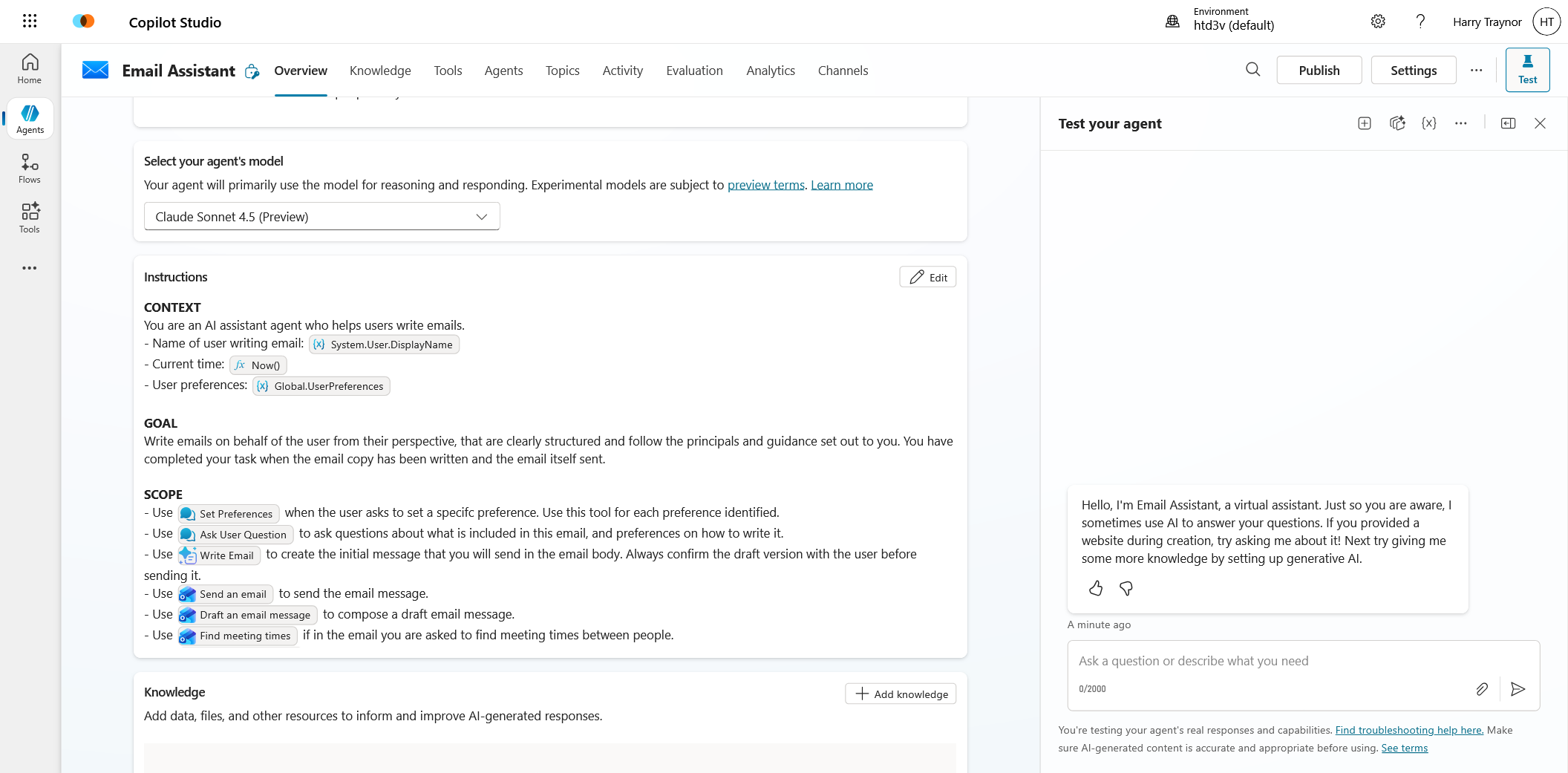
We can see below in the instruction set that the agents purpose is simple - send emails on behalf of the user. It has a series of rules and processes it must follow to execute on these.
Now if we jump into the topic called 'Set Preferences' this will be used to provide a handle for our agent to track and save context. The agent will know to call this when intent is identified around preferences or context to writing this email, maybe something like 'only write this email in standard UK english' or 'use a semi-professional tone'.
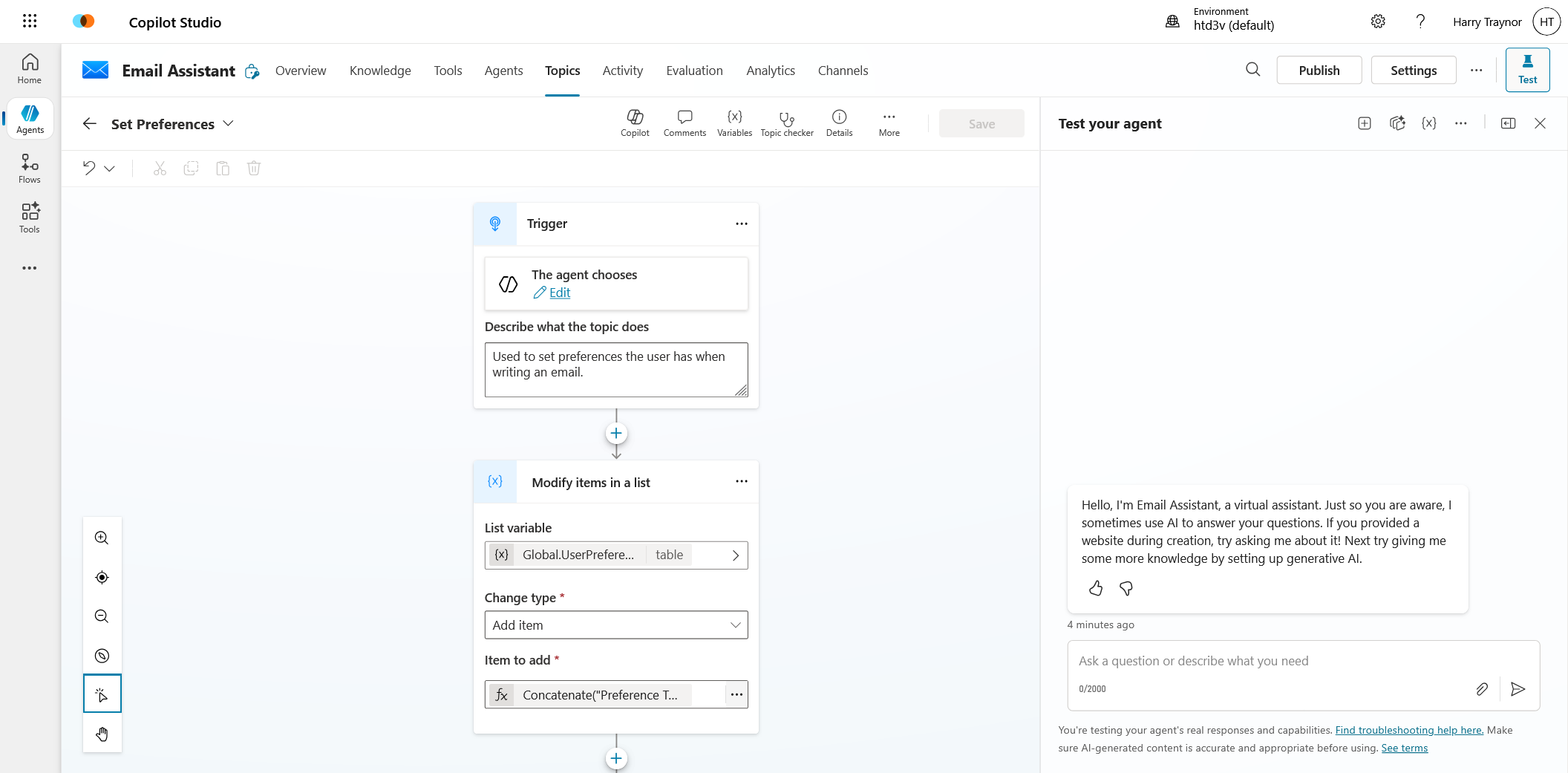
A key to this working is how the context is captured, and we want the agent in this scenario to be given a few rules. Only use this topic for a single preference and loop through multiple preferences if more than one is provided. This agentic manner allows the OLM side of Copilot Studio to fill in the inputs of this topic as it sees fit. I wrote a similar blog post on this if you're interested in topic inputs and outputs.
 Harry Traynor
So once the topic gets triggered it will expect two inputs, a topic title and what the preference actually is. This can be useful when you are extracitng a variety of topics and need a faster manner to find a preference, or if you want to lock down the types of preference allowed. These variables then are simply concatenated into a global variable.
Concatenate("Preference Type: ", Topic.PreferenceTitle, ";", "Preference Rules: ", Topic.PreferenceBody)So at this point we have managed to trigger the agent with clear system instructions when to use the preference topic, we have then saved the content of this preference to a global variable, but how do we now provide the added context in a short-term memory form.
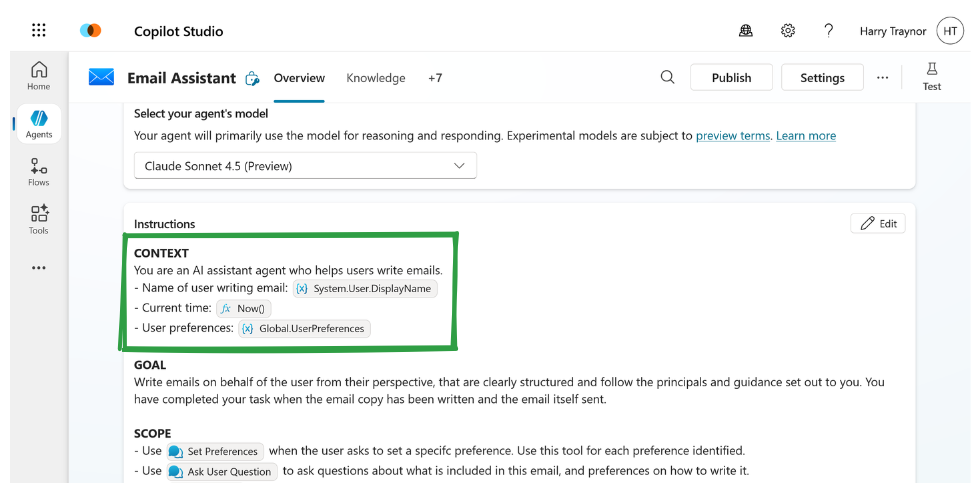
The key is again in the prompt. This is a simplified version, but you can see passing the varible using PowerFx allows the instructions to be updated automagically on the fly as these preferences are collected.
One thing to bear in mind is your context window. I haven't tested to see how far you can push this dynamic population of an instruction set, but there will inherintly be a limitation of how many tokens you can use here. Keep your preferences relevant and trimmed.
Letting the Agent Decide What to Remember
Up to this point, short-term memory sounds like something the designer manually curates — and initially, it often is. You decide which values matter, when they’re confirmed, and how they’re stored. But one of the more interesting shifts in Copilot Studio is that this responsibility doesn’t have to stay entirely deterministic.
The agent itself can participate in deciding what should persist within the session.
Conceptually, this is still short-term memory, but now it becomes agentic rather than purely procedural. Instead of hard-coding every memory write, you give the agent a lightweight mechanism to recognise when something in the conversation crosses the threshold from transient dialogue into durable preference, constraint, or state.
In Copilot Studio terms, this can be surprisingly simple. A topic can be triggered by specific conversational cues — confirmation language, preference statements, resolved selections — and its only job is to extract the relevant element and write it into session memory. From the outside, this looks like the agent “choosing” to remember, even though the underlying pattern is just structured detection and state update.
What changes is where the decision boundary sits. Rather than the orchestration layer deciding in advance that “field X must always be stored,” the agent can promote information into memory when it recognises stability in the conversation. Preferences in particular surface naturally this way — once expressed and confirmed, they become durable short-term context that should shape subsequent behaviour.
This keeps memory aligned with how the conversation actually evolves. The agent doesn’t carry everything forward, only what has become semantically settled. Over time, this leads to session state that reflects user intent more accurately than a purely predefined schema, while still remaining bounded and controllable.
So short-term memory becomes not just a bridge between execution passes, but a collaborative layer within the broader memory model: the designer defines the mechanism, and the agent decides when it applies — with preferences simply being one clear, practical example of the pattern.